仓库地址
luna库主要作用是lua/c++绑定, 即方便导出c++类供lua使用
使用demo地址
luna库使用方法
c++侧
class中使用DECLARE_LUA_CLASS(navmesh);
1
2
3
4
5
6
7
class navmesh {
public:
    navmesh() = default;
    ~navmesh();
    DECLARE_LUA_CLASS(navmesh);
    ...
};
方法导出
1
2
3
4
5
6
LUA_EXPORT_CLASS_BEGIN(navmesh)
LUA_EXPORT_METHOD(set_flags)
LUA_EXPORT_METHOD(set_flags_)
LUA_EXPORT_METHOD(set_extent)
LUA_EXPORT_METHOD(find_path)
LUA_EXPORT_CLASS_END()
lua接口
主要通过lua_push_object(L, m_navmesh);将数据返回给lua
1
2
3
4
5
6
7
8
9
10
11
12
13
14
15
16
17
18
19
static int lua_navmesh_create(lua_State* L)
{
    ...
    auto m_navmesh = new navmesh();
    ...
    lua_push_object(L, m_navmesh);
    return 1;
}

int luaopen_navmesh(lua_State* L)
{
    luaL_checkversion(L);
    luaL_Reg l[] = {
        { "create", lua_navmesh_create},
        { NULL, NULL },
    };
    luaL_newlib(L, l);
    return 1;
}
lua侧
1
2
3
4
5
6
7
8
9
10
local navmesh = require "navmesh"
local function init_navmesh()
    local query_extent = {x=50, y=50, z=250}
    local include_flag = 32767
    local exclude_flag = 0
    local navmesh_instance = navmesh.create("../../app/demo/demo.navmesh", include_flag, exclude_flag, query_extent)
    assert(navmesh_instance)
    navmesh_instance.set_flags_(32767, 0);
end
init_navmesh()
宏展开
通过下面设置,可以得到*.i文件
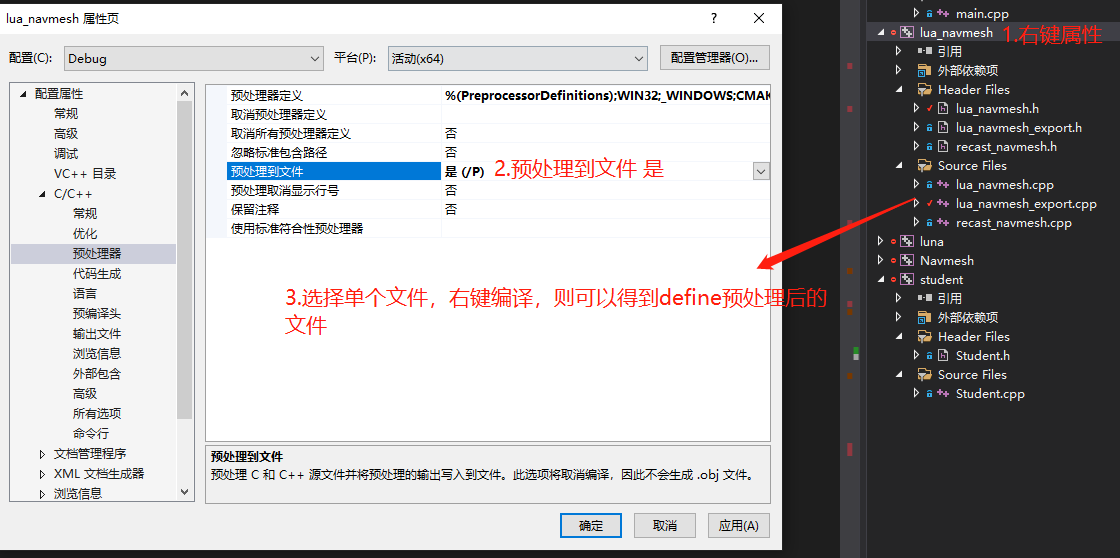 展开前
展开前
1
    DECLARE_LUA_CLASS(navmesh);
展开后
1
const char* lua_get_meta_name() { return "_class_meta:""navmesh"; } lua_member_item* lua_get_meta_data();
展开前
1
2
3
4
5
6
LUA_EXPORT_CLASS_BEGIN(navmesh)
LUA_EXPORT_METHOD(set_flags)
LUA_EXPORT_METHOD(set_flags_)
LUA_EXPORT_METHOD(set_extent)
LUA_EXPORT_METHOD(find_path)
LUA_EXPORT_CLASS_END()
展开后
1
2
3
4
5
6
lua_member_item* navmesh::lua_get_meta_data() { using class_type = navmesh; static lua_member_item s_member_list[] = {
{ "set_flags", 0, lua_export_helper::getter(&class_type::set_flags), lua_export_helper::setter(&class_type::set_flags)},
{ "set_flags_", 0, lua_export_helper::getter(&class_type::set_flags_), lua_export_helper::setter(&class_type::set_flags_)},
{ "set_extent", 0, lua_export_helper::getter(&class_type::set_extent), lua_export_helper::setter(&class_type::set_extent)},
{ "find_path", 0, lua_export_helper::getter(&class_type::find_path), lua_export_helper::setter(&class_type::find_path)},
{ nullptr, 0, luna_member_wrapper(), luna_member_wrapper()} }; return s_member_list; }
lua_export_helper是导出帮助类, 其中的getter,setter匹配着不同函数的形式, 返回同一个函数签名
1
using luna_member_wrapper = std::function<void(lua_State*, void*, char*)>;
比如lua_export_helper::getter(&class_type::set_flags),即lua_export_helper::getter(&navmesh::set_flags)
set_flags的函数签名是int set_flags(lua_State* L);,对应着如下的getter,其中return_type是int,T是navmesh,arg_types是lua_State* L
1
2
3
4
5
6
7
8
    template <typename return_type, typename T, typename... arg_types>
    static luna_member_wrapper getter(return_type(T::*func)(arg_types...)) {
        return [adapter=lua_adapter(func)](lua_State* L, void* obj, char*) mutable {
            lua_pushlightuserdata(L, obj);
            lua_pushlightuserdata(L, &adapter);
            lua_pushcclosure(L, _lua_object_bridge, 2);
        };
    }
set_flags_的函数签名是bool set_flags_(int include_flags, int exclude_flags);,也对应着该getter,其中return_type是bool,T是navmesh,args_types是int include_flags, int exclude_flags。
调用过程
local navmesh = require "navmesh"通过require "navmesh", 找到c++侧的luaopen_navmesh函数- lua侧的
create函数在c++对应lua_navmesh_create, 所以navmesh.create(...)相当于直接调用c++的lua_navmesh_create
1
2
3
4
luaL_Reg l[] = {
    { "create", lua_navmesh_create},
    { NULL, NULL },
};
lua_navmesh_create主要是初始化一个navmesh实例, 并且通过lua_push_object的方式将封装好的数据放在栈上,return 1则会把这个数据返回给lualua_push_object过程有点复杂, 通过注释的方式将栈的情况写出来, 可以看出返回lua的是一个table,{__pointer__:obj},obj则是c++类navmesh指针,使用的是lua_pushlightuserdata放到栈上
1
2
3
4
5
6
7
8
9
10
11
12
13
14
15
16
17
18
19
20
21
22
23
24
25
26
27
28
29
30
31
32
33
34
35
36
37
38
39
40
41
42
43
44
45
46
47
48
49
50
51
52
53
54
55
56
57
58
59
template <typename T>
void lua_push_object(lua_State* L, T obj) {
    if (obj == nullptr) {
        lua_pushnil(L);
        return;
    }

    lua_getfield(L, LUA_REGISTRYINDEX, "__objects__");
    if (lua_isnil(L, -1)) {
        lua_pop(L, 1);
        lua_newtable(L); // L

        lua_newtable(L); // L, L1
        lua_pushstring(L, "v"); // L, L1, "v"
        lua_setfield(L, -2, "__mode"); // L, L1 {"__mode__":v}
        lua_setmetatable(L, -2); // L

        lua_pushvalue(L, -1); // L, L
        lua_setfield(L, LUA_REGISTRYINDEX, "__objects__"); // L
    }

    char key[MAX_LUA_OBJECT_KEY];
    const char* pkey = lua_get_object_key(key, obj);
    if (pkey == nullptr) {
        lua_pop(L, 1);
        lua_pushnil(L);
        return;
    }

    // stack: __objects__
    if (lua_getfield(L, -1, pkey) != LUA_TTABLE) { // L, nullptr
        if (!_lua_set_fence(L, pkey)) {
            lua_remove(L, -2);
            return;
        }

        lua_pop(L, 1); // L

        lua_newtable(L);// L, L1
        lua_pushstring(L, "__pointer__"); // L, L1, "__pointer__"
        lua_pushlightuserdata(L, obj); // L, L1, "__pointer__", obj
        lua_rawset(L, -3); // L, L1 {"__pointer__":obj}

        // stack: __objects__, tab
        const char* meta_name = obj->lua_get_meta_name();
        luaL_getmetatable(L, meta_name); // L, L1, meta
        if (lua_isnil(L, -1)) {
            lua_remove(L, -1);
            lua_register_class(L, obj);
            luaL_getmetatable(L, meta_name);
        }
        lua_setmetatable(L, -2); // L, L1

        // stack: __objects__, tab
        lua_pushvalue(L, -1); // L, L1, L1
        lua_setfield(L, -3, pkey); // L {"pkey":L1}, L1
    }
    lua_remove(L, -2); // L1 {"__pointer__":obj}
}
- 在返回给lua之前,先通过
lua_register_class(L, obj);为待返回的table设置元表,这里__index对应的是lua_pushcfunction(L, &lua_member_index<T>);,除了设置元方法外,s_member_list也挨个放入到元表中。
1
2
3
4
5
6
7
8
9
10
11
12
13
14
15
16
17
18
19
20
21
22
23
24
25
26
27
28
29
30
31
32
33
34
template <typename T>
void lua_register_class(lua_State* L, T* obj) {
    int top = lua_gettop(L);
    const char* meta_name = obj->lua_get_meta_name();
    lua_member_item* item = obj->lua_get_meta_data();

    luaL_newmetatable(L, meta_name);
    lua_pushstring(L, "__index");
    lua_pushcfunction(L, &lua_member_index<T>);
    lua_rawset(L, -3);

    lua_pushstring(L, "__newindex");
    lua_pushcfunction(L, &lua_member_new_index<T>);
    lua_rawset(L, -3);

    lua_pushstring(L, "__gc");
    lua_pushcfunction(L, &lua_object_gc<T>);
    lua_rawset(L, -3);

    while (item->name) {
        const char* name = item->name;
        // export member name "m_xxx" as "xxx"
#if !defined(LUNA_KEEP_MEMBER_PREFIX)
        if (name[0] == 'm' && name[1] == '_')
            name += 2;
#endif
        lua_pushstring(L, name);
        lua_pushlightuserdata(L, item);
        lua_rawset(L, -3);
        item++;
    }

    lua_settop(L, top);
}
- 调到
lua_member_index时,可见附分析,这时候栈中的数据有两个,栈底是{"__pointer":obj},栈顶是字符串set_flags,通过set_flags字符串可以从obj中的lua_get_meta_data得到对应的userdata,比如set_flags对应的是item是{ "set_flags", 0, lua_export_helper::getter(&class_type::set_flags), lua_export_helper::setter(&class_type::set_flags)},, 这样满足了item->getter(L, obj, (char*)obj + item->offset)的所有参数。
1
2
3
4
5
6
7
8
9
10
11
12
13
14
15
16
17
18
19
20
21
22
23
24
25
26
27
28
29
template <typename T>
int lua_member_index(lua_State* L) {
    T* obj = lua_to_object<T*>(L, 1);
    if (obj == nullptr) {
        lua_pushnil(L);
        return 1;
    }

    const char* key = lua_tostring(L, 2);
    const char* meta_name = obj->lua_get_meta_name();
    if (key == nullptr || meta_name == nullptr) {
        lua_pushnil(L);
        return 1;
    }

    luaL_getmetatable(L, meta_name);
    lua_pushstring(L, key);
    lua_rawget(L, -2);

    auto item = (lua_member_item*)lua_touserdata(L, -1);
    if (item == nullptr) {
        lua_pushnil(L);
        return 1;
    }

    lua_settop(L, 2);
    item->getter(L, obj, (char*)obj + item->offset);
    return 1;
}
item->getter(L, obj, (char*)obj + item->offset),该调用首先进入的函数是,其中的obj是6过程中得到的。
1
2
3
4
5
6
7
8
    template <typename return_type, typename T, typename... arg_types>
    static luna_member_wrapper getter(return_type(T::*func)(arg_types...)) {
        return [adapter=lua_adapter(func)](lua_State* L, void* obj, char*) mutable {
            lua_pushlightuserdata(L, obj);
            lua_pushlightuserdata(L, &adapter);
            lua_pushcclosure(L, _lua_object_bridge, 2);
        };
    }
getter函数将obj和adapter入栈,lua_pushcclosure(L, _lua_object_bridge, 2);中upvalue的值是2,也就是将obj和adapter也作为函数闭包的一部分,这里的adapter函数是set_flags,_lua_object_bridge的返回值也就是adapter对应的函数指针set_flags,lua测再调用set_flags,这时候原本在lua测的set_flags的参数才会入栈,所以实际调用_lua_object_bridge的时候除了有两个upvalue之外,还有函数实际的参数。
1
2
3
4
5
6
7
8
int _lua_object_bridge(lua_State* L) {
    void* obj = lua_touserdata(L, lua_upvalueindex(1));
    lua_object_function* func = (lua_object_function*)lua_touserdata(L, lua_upvalueindex(2));
    if (obj != nullptr && func != nullptr) {
        return (*func)(obj, L);
    }
    return 0;
}
lua_adapter对于类函数来说函数的返回值是统一签名using lua_object_function = std::function<int(void*, lua_State*)>;。对于set_flags函数来说匹配的lua_adapter是下面函数, 这样直接执行对应函数
1
2
3
4
5
6
7
8
9
10
11
12
13
14
template <typename T>
lua_object_function lua_adapter(int(T::*func)(lua_State* L)) {
    return [=](void* obj, lua_State* L) {
        T* this_ptr = (T*)obj;
        return (this_ptr->*func)(L);
    };
}

int navmesh::set_flags(lua_State* L) {
    auto include_flag = lua_tonumber(L, 1);
    auto exclude_flag = lua_tonumber(L, 2);
    m_navmesh.SetFlags(include_flag, exclude_flag);
    return 0;
}
而对于set_flags_函数来说匹配的是下面函数
1
2
3
4
5
6
7
8
9
10
11
12
template <typename return_type, typename T, typename... arg_types>
lua_object_function lua_adapter(return_type(T::*func)(arg_types...) const) {
    return [=](void* obj, lua_State* L) {
        native_to_lua(L, call_helper(L, (T*)obj, func, std::make_index_sequence<sizeof...(arg_types)>()));
        return 1;
    };
}

bool navmesh::set_flags_(int include_flags, int exclude_flags) {
    m_navmesh.SetFlags(include_flags, exclude_flags);
    return true;
}
call_helper通过index_sequence将函数参数依次展开,将每个参数调用lua_to_native,相当于auto include_flag = lua_tonumber(L, 1);,将转化后的参数传入到set_flags中,最后再通过native_to_lua将返回值入栈相当于lua_pushboolean(L, true);
所以set_flags和set_flags_都可以直接导出,区别在于luna会帮助set_flags处理参数出栈和入栈的操作。
1
2
3
4
5
template<size_t... integers, typename return_type, typename class_type, typename... arg_types>
return_type call_helper(lua_State* L, class_type* obj, return_type(class_type::*func)(arg_types...), std::index_sequence<integers...>&&) {
    return (obj->*func)(lua_to_native<arg_types>(L, integers + 1)...);
}
附
一般注册函数的方法,通过luaL_Reg数组,
1
2
3
4
5
6
7
8
9
10
11
12
13
14
15
16
17
18
static  luaL_Reg arrayFunc_meta[] =
{
	{ "getName", GetName },
	{ "setName", SetName },
	{ "getAge", GetAge },
	{ "setAge", SetAge },
	{ NULL, NULL }
};

int luaopen_student(lua_State *L)
{
	luaL_newmetatable(L, "Student");
	lua_pushvalue(L, -1);
	lua_setfield(L, -2, "__index");
	luaL_setfuncs(L, arrayFunc_meta, 0);
	luaL_newlib(L, arrayFunc);
	return 1;
}
luna使用的是lua_pushcfunction(L, &lua_member_index<T>);
通过打印内容可以看到不同
1
2
3
4
5
6
7
8
9
10
11
    local navmesh = require "navmesh"
    local navmesh_instance = navmesh.create(...)
    log_tree("navmesh", navmesh)
    log_tree("navmesh_instance", navmesh_instance)
    log_tree("navmesh_instance_meta", getmetatable(navmesh_instance))

    local student = require "student"
    local first = student.new()
    log_tree("student", student)
    log_tree("first", first)
    log_tree("first_meta", getmetatable(first))
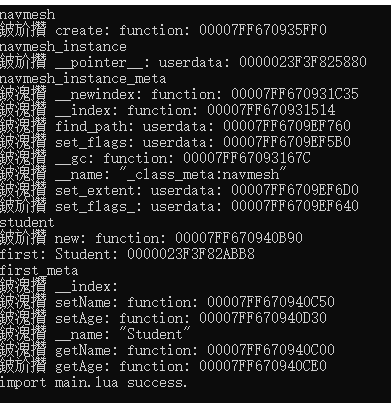
luna导出的__index是function, 通过luaL_Reg导出的__index是nil,通过c++代码可以发现__index指向的是metatable自身。所以lua调用两种不同的c++接口形式也不一样。
luna导出的接口直接navmesh_instance.set_flags_(32767, 0);,首先navmesh_instance本身没有set_flags方法,于是调用找到metatable的__index字段, 对应着int lua_member_index(lua_State* L) {...}, 这时候栈中的数据有两个,栈底是{"__pointer":obj},栈顶是字符串set_flags,再具体处理。
可以通过下面例子了解
1
2
3
4
5
6
7
8
9
10
11
12
local tb = {"tb_content"}
local mt = {
  ["__index"] = function(self, ...) print(self[1], ...) end
}
setmetatable(tb, mt)
tb.SetName("Nioh")
-- 输出是
-- tb_content	SetName
-- lua: d:\Code\LuaCode\test.lua:38: attempt to call a nil value (field 'SetName')
-- stack traceback:
	-- d:\Code\LuaCode\test.lua:38: in main chunk
	-- [C]: in ?
普通导出调用接口是first:setName("Nioh1"),用的是冒号,相当于first.setName(first,"Nioh1"),首先first本身没有setName方法,于是找到metatable的__index,指向的是metatable本身,setName和metatable中的setName直接匹配上。栈顶是student*userdata,栈顶是字符串setName,直接在对应的函数体里处理。
1
2
3
4
5
6
7
8
9
10
static int SetName(lua_State *L)
{
	// 第一个参数是userdata
	StudentTag *pStudent = (StudentTag *)luaL_checkudata(L, 1, "Student");
	// 第二个参数是一个字符串
	const char *pName = luaL_checkstring(L, 2);
	luaL_argcheck(L, pName != NULL && pName != "", 2, "Wrong Parameter");
	pStudent->strName =(char*) pName;
	return 0;
}
所以两者的区别在于c++返回给lua的数据,如何在lua调用c++的时候传递给c++
那luna导出的函数调用是如何获取实际函数参数的,比如navmesh_instance.set_flags_(32767, 0);通过lua_pushcclosure(L, _lua_object_bridge, 2);将闭包push到栈上,在没push之前,栈上有两个数据obj和adapter,push之后栈变成三个数据,栈顶是lua_CFunction。这样push之后,lua会调用这个lua_CFunction并且将实际的参数(32767,0)入栈,所以_lua_object_bridge的发起方是lua侧,在_lua_object_bridge函数的内部可以通过upvalueindex获取obj和adapter,栈上1位置是32767,2位置是0
可以看个例子
1
2
3
4
5
6
7
8
9
10
11
12
13
14
15
local tb = {"tb"}
local mt = {
  ["__index"] = function(self, ...)
    -- 这里的return SetName相当于lua_pushcclosure(L, _lua_object_bridge, 2);
    -- 所以print(xx)的输出是Nioh
    -- 而这里的...就是SetName字符串, 在luna内部通过SetName字符串找到对应的函数
    -- 这里的演示是直接给出SetName函数,本质就是主动把要调用的函数入栈,让lua自己调用
    local function SetName(xx)
      print(xx) --Nioh
    end
    return SetName
  end
}
setmetatable(tb, mt)
tb.SetName("Nioh")
